Update Slice:表单状态不是 DTO
Update Slice:修改,但不要造出 Store 上帝
Section titled “Update Slice:修改,但不要造出 Store 上帝”修改数据是一种 Command。
并不是因为 PUT 或 PATCH 在技术上有多复杂。
而是因为 Update 会改变一个已经存在的业务对象。
Create 表达的是:
创建一个新对象。
Delete 表达的是:
删除一个已有对象。
Update 表达的是:
把一个已有对象修改为新的状态。
这听起来和 Create 很接近。
从技术 Flow 上看,它们确实也非常相似。
但这里仍然有同一条原则:
Update 不应该最终退化成一次快速的表单 Submit:
submit → http.put() → reload() → toast() → navigate()代码很短。
但这样一来,Component 知道得太多:
- 它知道 HTTP;
- 它知道 Update Operation;
- 它知道 Reload;
- 它知道 Notification;
- 它知道 Navigation;
- 它知道如何处理错误。
因此,这篇文章会把 Update 切成一条 Command Flow:
update intent → facade.updateArticle(command) → articleUpdateEvents.updateRequested(command) → ArticleCommandStore → ArticleCommand.updateArticle(command) → updateSucceeded | updateFailed → reload / notification / navigationSubmit 不直接执行更新。
Submit 只发送一个“修改”的 Intent。
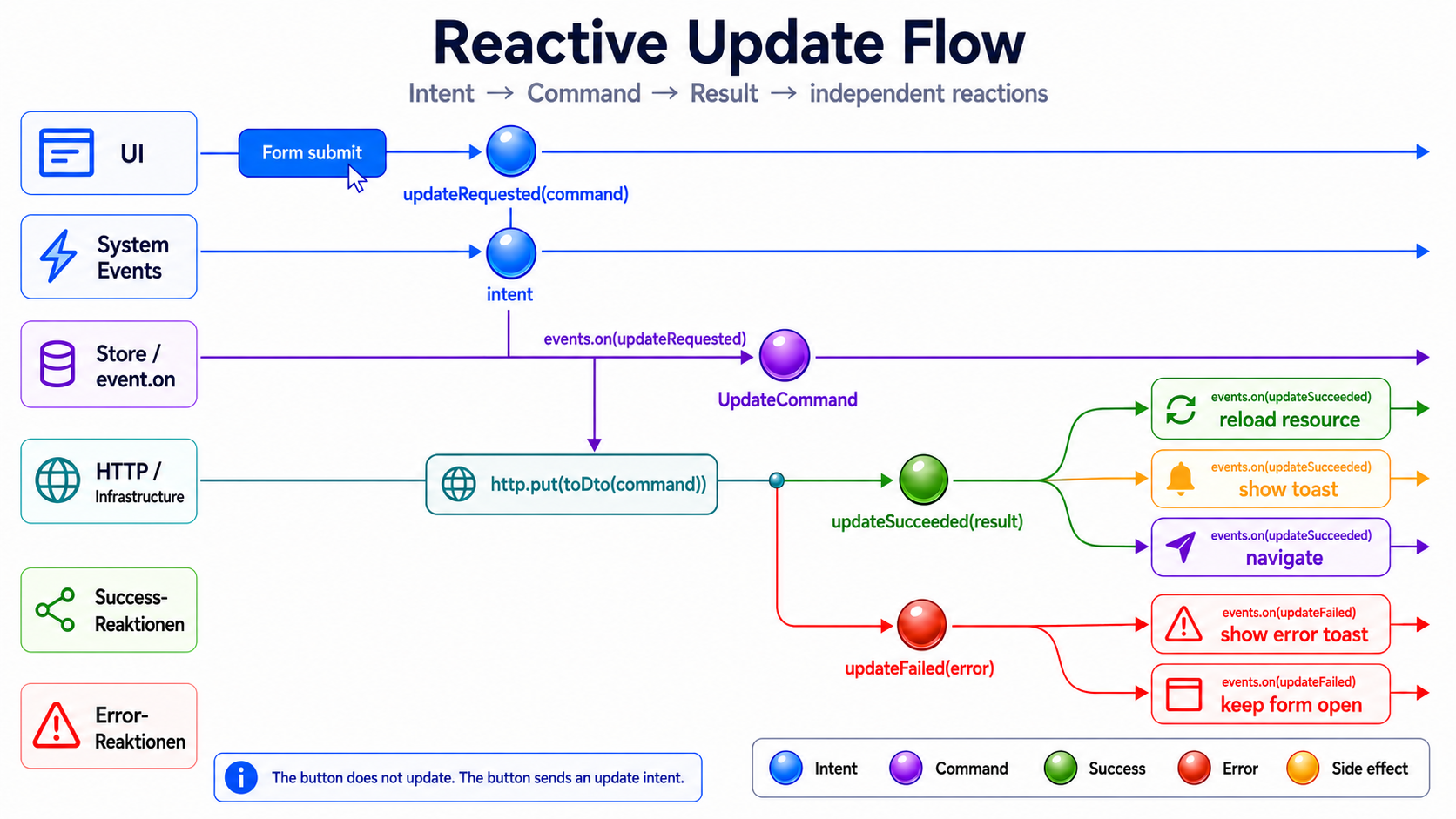
最重要的一点是:
Update 不是“表单后面接一个 http.put()”。
Update 是一个 Intent。
这个 Intent 可能成功。
也可能失败。
而两个结果都可以触发多个彼此独立的后续反应。
updateRequested → PUT → updateSucceeded | updateFailed → unabhängige Reaktionen这与下面这种切法不同:
submit → http.put() → reloadList() → toast() → navigate()在直接的流程里,每一步都知道得太多,也过早知道下一步要做什么。
在 Event-driven Slice 中,Intent、执行和后续反应彼此分离。
这篇文章刻意不讨论什么:复杂表单
Section titled “这篇文章刻意不讨论什么:复杂表单”Update Flow 很容易迅速变大。
可以讨论的内容很多:
- 来自 Read Model 的初始值;
- Dirty State;
- Validation;
- Partial Update;
- Full Update;
- Optimistic Update;
- 并发编辑冲突;
- ETag 或版本号;
- Save-on-blur;
- Auto-Save。
这些都很重要。
但不是本文的重点。
这里我们只关注做出下面这个决定之后的 Slice:
用户已经提交了一次修改。
从这一刻开始,Form State 转换成一个 Command。
Form submit → UpdateArticleCommand → updateRequested本文里的 Form 会刻意保持很薄。
不讨论 Validation。
不讨论 Dirty Tracking。
不讨论 Conflict Handling。
只看 Update Flow。
为什么不直接在 Read Store 里更新?
Section titled “为什么不直接在 Read Store 里更新?”这种诱惑很大。
Read Store 反正已经知道这个 Article。
于是很容易顺手再加一个方法:
updateArticle(command: UpdateArticleCommand): void { this.http.put(`/api/article/${command.articleId}`, command).subscribe(() => { this.reload(); });}这样当然能工作。
但 Store 的角色已经改变了。
它不再只是 Read Model。
它突然也成了 Command Handler。
它加载数据。
它持有 ViewModel。
它修改数据。
它处理错误。
它触发 Reload。
以后也许还会顺手显示 Toast,或者导航回去。
最后它虽然还叫 ArticleStore,实际上已经成了一个小型上帝对象。
这个 Slice 正是要避免这一点。
ArticleResource  → kapselt private httpResource  → stellt article, isLoading, error und reload bereit
Read Store  → orchestriert Source Signals  → berechnet ViewModel  → reagiert auf loadRequested
Command Store  → hört auf updateRequested  → führt PUT aus  → feuert updateSucceeded / updateFailed  → leitet Success-Reaktionen als Events weiter
Read Store 继续只做 Read Store。
Command Store 继续只做 Command Store。
这个 Slice 可以采用如下结构:
article/├── infrastructure/│ ├── article.command.ts│ ├── article-update.dto.ts│ ├── article-update.mapper.ts│ ├── article.dto.ts│ ├── article.mapper.ts│ └── article.resource.ts├── +state/│ ├── article.store.ts│ ├── article.vm.ts│ ├── article-view-model.mapper.ts│ ├── update-article.command.ts│ ├── article-update.events.ts│ ├── article-read.events.ts│ └── article-command.store.ts├── application/│ └── article-update.facade.ts└── presentation/ ├── article-edit-page.component.ts └── article-edit-page.component.html如果 Create、Update 和 Delete 位于同一个 Feature 中,它们通常可以共享同一套 Command Infrastructure:
+state/├── create-article.command.ts├── update-article.command.ts├── delete-article.command.ts├── article-create.events.ts├── article-update.events.ts├── article-delete.events.ts└── article-command.store.ts
infrastructure/└── article.command.ts
Pattern 仍然相同:
ArticleCommandStore → nutzt ArticleCommandStore 决定什么时候执行一次 Write Operation。
Infrastructure 决定如何把这个 Write 翻译成外部 API 所需的形式。
Read 侧仍然遵循 Retrieve Slice 中的同一条边界:
private httpResource → ArticleResource → sichere Source Signals → ArticleStore → ViewModel具体的 HttpResourceRef 留在 Infrastructure 内部。
Read Store 不需要知道 hasValue(),也不需要知道 value() 在什么情况下会抛错。
1. Command:描述修改意图
Section titled “1. Command:描述修改意图”Update Command 需要已有 Article 的 ID,以及新的值。
export interface UpdateArticleCommand { readonly articleId: string; readonly title: string; readonly subtitle: string; readonly content: string;}这不是 DTO。
不是 ViewModel。
也不是表单模型。
这是业务 Intent:
UpdateArticleCommand = Benutzer möchte diesen Artikel ändernCommand 包含 articleId,因为 Update 的目标是一个已经存在的对象。
DTO 会在之后进入 API Boundary 时才创建。
不在 Form 中。
不在 Facade 中。
也不在 Read Store 中。
2. Events:requested、succeeded、failed
Section titled “2. Events:requested、succeeded、failed”接下来定义 Update Slice 的 Events。
import { eventGroup, type } from '@ngrx/signals/events';
import { UpdateArticleCommand } from './update-article.command';
export const articleUpdateEvents = eventGroup({  source: 'Article Update',  events: {    updateRequested: type<UpdateArticleCommand>(),    updateSucceeded: type<{ readonly articleId: string }>(),    updateFailed: type<{      readonly articleId: string;      readonly error: unknown;    }>(),  },});
这里依然是语言比语法更重要:
updateRequestedupdateSucceededupdateFailedupdateRequested 还不是结果。
它只是一个 Intent。
updateSucceeded 和 updateFailed 才是执行后的结果。
我还会把 articleId 放进 updateFailed。
为什么?
因为没有上下文的错误价值很低。
尤其当多个 Article 都可能被编辑时,我们需要知道:
Welches Update ist fehlgeschlagen?这样,错误反应会更容易测试,也更容易追踪。
3. Read Event:把 Reload 建模成独立 Intent
Section titled “3. Read Event:把 Reload 建模成独立 Intent”Update 成功之后,需要重新获取已读取的数据。
但 Command Store 不应该直接认识 Read Store。
不要这样:
updateSucceeded → articleStore.reload()而是这样:
updateSucceeded → articleReadEvents.loadRequested() → Read Store stößt ArticleResource.reload() an为此我们定义一个 Read Event:
import { eventGroup, type } from '@ngrx/signals/events';
export const articleReadEvents = eventGroup({  source: 'Article Read',  events: {    loadRequested: type<void>(),  },});
这看起来多了一层很小的间接关系。
但这一层恰好就是边界。
Write 侧不规定 Read 侧如何加载。
它只表达:
这次 Write 成功之后,应该重新请求 Article 的 Read Data。
4. Infrastructure:Command 转成 DTO,然后执行 PUT
Section titled “4. Infrastructure:Command 转成 DTO,然后执行 PUT”在进入 Infrastructure 之前,我们一直使用 Command。
只有到了 API Boundary,DTO 才出现。
article-update.dto.ts
Section titled “article-update.dto.ts”export interface UpdateArticleDto { readonly title: string; readonly subtitle: string; readonly content: string;}
export interface UpdateArticleResponseDto { readonly id: string;}DTO 描述的是外部 Contract。
不是内部语言。
article-update.mapper.ts
Section titled “article-update.mapper.ts”import { UpdateArticleCommand } from '../+state/update-article.command';import { UpdateArticleDto } from './article-update.dto';
export const toUpdateArticleDto = ({ title, subtitle, content }: UpdateArticleCommand): UpdateArticleDto => ({ title, subtitle, content,});这里的 Mapping 很无聊。
这是好事。
但它依然明确标出了正确的边界。
如果外部 API 将来需要不同字段名、额外 Wrapper 或技术元数据,变化就发生在这里。
不在 Component。
不在 Facade。
也不在 Command。
article.command.ts
Section titled “article.command.ts”import { HttpClient } from '@angular/common/http';import { Injectable, inject } from '@angular/core';
import { UpdateArticleCommand } from '../+state/update-article.command';import { UpdateArticleResponseDto } from './article-update.dto';import { toUpdateArticleDto } from './article-update.mapper';
@Injectable()export class ArticleCommand { private readonly http = inject(HttpClient);
readonly updateArticle = (command: UpdateArticleCommand) => this.http.put<UpdateArticleResponseDto>(`https://lorem-api.com/api/article/${command.articleId}`, toUpdateArticleDto(command));}名字刻意叫 ArticleCommand。
不是 ArticleResource。
也不是 ArticleStore。
这个类集中封装了面向外部 API 的 Write Operation。
UpdateArticleCommand  → fachliche Absicht
ArticleCommand  → Infrastructure-Operationen für Write-Zugriffe
这个例子使用 PUT,因为 Command 会完整传入 Article 的新值。
如果某个 Feature 有意只更新少数字段,那么 PATCH 应该是另一条明确的 Flow。
关键点不变:
UpdateArticleCommand → toUpdateArticleDto() → PUTDTO 在 API Boundary 上产生。
5. Command Store:执行 requested,发布结果
Section titled “5. Command Store:执行 requested,发布结果”现在来到 Command Store。
它不持有 ViewModel。
它不负责 Rendering。
它监听 Event,执行 Infrastructure,并发布结果 Event。
import { inject } from '@angular/core';import { signalStore, withProps } from '@ngrx/signals';import { Events, withEventHandlers } from '@ngrx/signals/events';import { mapResponse } from '@ngrx/operators';import { exhaustMap, map } from 'rxjs';
import { ArticleCommand } from '../infrastructure/article.command';import { articleReadEvents } from './article-read.events';import { articleUpdateEvents } from './article-update.events';
export const ArticleCommandStore = signalStore(  withProps(() => ({    _articleCommand: inject(ArticleCommand),  })),
  withEventHandlers(({ _articleCommand }, events = inject(Events)) => ({    updateArticle$: events.on(articleUpdateEvents.updateRequested).pipe(      exhaustMap((command) =>        _articleCommand.updateArticle(command).pipe(          mapResponse({            next: (response) =>              articleUpdateEvents.updateSucceeded({                articleId: response.id,              }),            error: (error: unknown) =>              articleUpdateEvents.updateFailed({                articleId: command.articleId,                error,              }),          }),        ),      ),    ),
    reloadOnUpdateSucceeded$: events.on(articleUpdateEvents.updateSucceeded).pipe(map(() => articleReadEvents.loadRequested())),
    // notifyOnUpdateSucceeded$: events    //   .on(articleUpdateEvents.updateSucceeded)    //   .pipe(    //     map(() =>    //       notificationEvents.showSuccess({    //         summary: {    //           key: 'articles.notifications.update.success.summary',    //         },    //         detail: {    //           key: 'articles.notifications.update.success.detail',    //         },    //       }),    //     ),    //   ),
    // notifyOnUpdateFailed$: events    //   .on(articleUpdateEvents.updateFailed)    //   .pipe(    //     map(() =>    //       notificationEvents.showError({    //         summary: {    //           key: 'articles.notifications.update.error.summary',    //         },    //         detail: {    //           key: 'articles.notifications.update.error.detail',    //         },    //       }),    //     ),    //   ),
    // navigateOnUpdateSucceeded$: events    //   .on(articleUpdateEvents.updateSucceeded)    //   .pipe(    //     map(() => articleNavigationIntentEvents.openList()),    //   ),  })),);
Store 做三件事:
1. updateRequested entgegennehmen2. PUT über Infrastructure ausführen3. updateSucceeded oder updateFailed veröffentlichen然后,它把 updateSucceeded 转换成一个 Read Event:
updateSucceeded → loadRequested这里刻意不直接调用 Read Store。
Command Store 不认识 Resource。
不认识 ViewModel。
也不认识 Presentation。
它只认识 Events。
为什么使用 mapResponse?
Section titled “为什么使用 mapResponse?”PUT 调用存在两个可能结果:
success  → updateSucceeded
error  → updateFailed
mapResponse 很适合把这两个结果清楚地表达出来。
成功分支生成 Success Event。
失败分支生成 Error Event。
mapResponse({ next: (response) => articleUpdateEvents.updateSucceeded({ articleId: response.id, }), error: (error: unknown) => articleUpdateEvents.updateFailed({ articleId: command.articleId, error, }),});这样 Command Store 可以保持声明式。
没有嵌套 subscribe。
没有 Component 内部的局部 Error Handling。
也没有在 Catch 中直接显示 Toast。
只有:
HTTP-Ergebnis → Event为什么使用 exhaustMap?
Section titled “为什么使用 exhaustMap?”Update 同样可能被重复触发。
用户点了两次。
Form Submit 了两次。
网络又很慢。
因此本文使用 exhaustMap。
exhaustMap  → ignoriert weitere Updates, solange eins läuft
concatMap  → queued Updates nacheinander
mergeMap  → erlaubt parallele Updates
switchMap  → bricht alte Updates ab
对于 Command 来说,switchMap 经常很危险。
Update 不是搜索请求。
一旦一个 Update 已经发出,通常不应该因为第二次 Submit 到来,就悄悄取消第一次操作。
对于这个简单 Slice,exhaustMap 是更保守的选择。
6. Success 后的反应继续使用 Events
Section titled “6. Success 后的反应继续使用 Events”本文中,Update 成功之后要重新加载数据。
以后也许还要显示 Notification,或者导航回列表。
重要的是方向:
updateSucceeded  → articleReadEvents.loadRequested()
updateSucceeded  → notificationEvents.showSuccess(...)
updateSucceeded  → articleNavigationIntentEvents.openList()
这些都是对 Event 的反应。
而不是 Command Store 内部直接执行的命令式 Side Effect。
因此这里使用 map。
从一个 Event 生成另一个 Event。
reloadOnUpdateSucceeded$: events .on(articleUpdateEvents.updateSucceeded) .pipe( map(() => articleReadEvents.loadRequested()), ),这比下面这种方式更容易测试:
tap(() => articleStore.reload());而且耦合更小。
Command Store 不会说:
Read Store,你现在重新加载。
它只会说:
有一个 Load 被请求了。
Read 侧自己决定这意味着什么。
Notification 也可以采用同样方式建模:
notifyOnUpdateSucceeded$: events .on(articleUpdateEvents.updateSucceeded) .pipe( map(() => notificationEvents.showSuccess({ summary: { key: 'articles.notifications.update.success.summary', }, detail: { key: 'articles.notifications.update.success.detail', }, }), ), ),本文不会完整实现 Notification 和 Navigation。
这里只点出这个方向。
关键在于:
updateSucceeded → loadRequested → showSuccess → openList只要一个反应仍然可以被描述成 Event,map 通常就是更清晰的选择。
tap 应该留给真正的命令式 Boundary:Router、Toast Service、Logging 或外部 API。
7. Read Store:响应 loadRequested
Section titled “7. Read Store:响应 loadRequested”具体的 Angular Resource 继续完整封装在 Infrastructure 中。
ArticleResource 私有持有 httpResource,对外只提供很小、命名明确的 API:
article: Signal<Article | null>isLoading: Signal<boolean>error: Signal<Error | undefined>reload(): void这样,技术层面的 Guard 也留在正确的位置。
hasValue() 用来保护对 value() 的访问。
这不是 Read Store 应该做的业务判断。
这是 Angular Resource 的 Lifecycle Semantics,因此应该留在拥有这个 Resource 的 Infrastructure Adapter 内。
之后,Read Store 不再认识:
HttpResourceRef;hasValue();value()的抛错行为;ResourceStatus;- Parse 或 Request 细节。
它只负责 Source Signal、ViewModel Projection 和 Read Intent 的编排。
import { computed, inject } from '@angular/core';import { signalStore, withComputed, withProps } from '@ngrx/signals';import { Events, withEventHandlers } from '@ngrx/signals/events';import { tap } from 'rxjs';
import { ArticleResource } from '../infrastructure/article.resource';import { articleReadEvents } from './article-read.events';import { toArticleViewModel } from './article-view-model.mapper';
export const ArticleStore = signalStore(  withProps(() => ({    _articleResource: inject(ArticleResource),  })),
  withComputed(({ _articleResource }) => ({    isLoading: _articleResource.isLoading,    error: _articleResource.error,    vm: computed(() => toArticleViewModel(_articleResource.article())),  })),
  withEventHandlers(({ _articleResource }, events = inject(Events)) => ({    reloadOnLoadRequested$: events.on(articleReadEvents.loadRequested).pipe(tap(() => _articleResource.reload())),  })),);
ViewModel Mapper 做的是这样的映射:
Article | null → ArticleVm | nullDomain Entity 本身继续保持严格。
不会为了让 Store 少写一个 Condition,就人为制造一个“空 Article”。
只要 Article 存在,它就必须有效。
无法读取到值时,在 Infrastructure Boundary 上统一归一化为 null。
Store 只继续投影这个 Source。
这里使用 tap 是合理的。
不是因为 Store 自己在执行 HTTP 或 Resource Logic。
而是因为 Event Flow 到这里确实要触发其 Infrastructure Dependency 上的一个显式 Operation:
loadRequested → ArticleResource.reload()在此之前,我们都只是把 Event 映射成另一个 Event。
到了这里,Read Operation 才真正被触发。
Store 本身仍然不会解释任何技术性的 Resource Lifecycle。
它只是编排:
article  → ArticleVm
loadRequested  → ArticleResource.reload()
这样,Read Flow 会保持安静而清晰。
阅读 Store 时,我们真正关心的是:
- 消费了哪个 Source;
- 生成了哪个 ViewModel;
- 哪个 Intent 会触发哪个 Operation。
而不是 httpResource 的使用说明书。
8. Application:Facade 发送 Intent
Section titled “8. Application:Facade 发送 Intent”Update Facade 不执行 HTTP。
它不知道 HttpClient。
也不知道 Resource。
它只发布 Intent。
import { Injectable } from '@angular/core';import { injectDispatch } from '@ngrx/signals/events';
import { UpdateArticleCommand } from '../+state/update-article.command';import { articleUpdateEvents } from '../+state/article-update.events';
@Injectable()export class ArticleUpdateFacade {  private readonly dispatchUpdate = injectDispatch(articleUpdateEvents);
  readonly updateArticle = (command: UpdateArticleCommand): void => {    this.dispatchUpdate.updateRequested(command);  };}
这就是 Edit UI 的公共 API:
updateArticle(command)Facade 不会直接更新 Article。
它只是发布“希望修改 Article”的 Intent。
Presentation → facade.updateArticle(command) → articleUpdateEvents.updateRequested(command)之后发生什么,已经不再属于 Presentation 的职责。
9. Presentation:让 Signal Form 保持薄
Section titled “9. Presentation:让 Signal Form 保持薄”输入层使用 Signal Forms。
但会刻意保持很薄。
Signal Forms 在这里不是架构。
它只是输入层。
Validation、Dirty State、Conflict Detection 和 Submit Status 都有意不在本文展开。
article-edit-page.component.ts
Section titled “article-edit-page.component.ts”import { Component, inject, signal } from '@angular/core';import { form } from '@angular/forms/signals';
import { ArticleCommandStore } from '../+state/article-command.store';import { ArticleStore } from '../+state/article.store';import { ArticleUpdateFacade } from '../application/article-update.facade';import { ArticleCommand } from '../infrastructure/article.command';import { ArticleResource } from '../infrastructure/article.resource';
export interface ArticleEditModel { readonly articleId: string; readonly title: string; readonly subtitle: string; readonly content: string;}
const existingArticle: ArticleEditModel = { articleId: 'foo', title: 'Existing title', subtitle: 'Existing subtitle', content: 'Existing content',};
@Component({ selector: 'app-article-edit-page', templateUrl: './article-edit-page.component.html', providers: [ArticleResource, ArticleCommand, ArticleStore, ArticleCommandStore, ArticleUpdateFacade],})export class ArticleEditPageComponent { protected readonly facade = inject(ArticleUpdateFacade);
protected readonly model = signal<ArticleEditModel>(existingArticle);
protected readonly articleForm = form(this.model);}这里的 existingArticle 有意代表“已经加载好的 Article”。
在真实应用中,这个值可能来自 Detail Retrieve Slice、Resolver、Route Input 或 Store Signal。
本文不进一步展开,因为否则文章会立刻变成 Selected-Id 或 byId 的文章。
这里关注的是 Update Submit:
Form model → UpdateArticleCommand → updateRequestedarticle-edit-page.component.html
Section titled “article-edit-page.component.html”<form class="article-edit" (ngSubmit)=" facade.updateArticle({ articleId: articleId(), title: model().title, subtitle: model().subtitle, content: model().content, }) "> <label> Titel <input [field]="articleForm.title" /> </label>
<label> Untertitel <input [field]="articleForm.subtitle" /> </label>
<label> Inhalt <textarea [field]="articleForm.content"></textarea> </label>
<button type="submit">Änderungen speichern</button></form>Template 刻意非常普通。
没有 HTTP。
没有 Store。
没有 Event Dispatch。
没有 Success Logic。
没有 Reload Logic。
没有 Navigation。
Presentation 收集 Form Data,然后调用 Facade。
仅此而已。
Form ändern → ngSubmit → facade.updateArticle(command)Submit 不是 Orchestrator。
它只发送修改 Intent。
10. Provider 与 Lifecycle
Section titled “10. Provider 与 Lifecycle”在这篇文章里,可以把整个 Slice 局部提供在 Page 或 Route 上。
providers: [ArticleResource, ArticleCommand, ArticleStore, ArticleCommandStore, ArticleUpdateFacade];真实应用中,我往往更倾向把这些 Provider 挂在 Route 上。
但对文章来说,局部 Variante 更有帮助,因为整个 Slice 的 Scope 会一眼可见。
重要的是:
ArticleResourceArticleCommandArticleStoreArticleCommandStoreArticleUpdateFacade共同构成这个 Update Slice 的 Scope。
ArticleResource 封装私有的 httpResource。
ArticleStore 消费它的 Source Signal,并编排 Read Flow。
ArticleCommandStore 也明确属于这个 Scope。
但这只解决了 Scope 的问题。
在真实应用里,还必须确保 Command Store 在这个 Slice 的 Lifecycle 中确实被实例化一次,否则它的 Event Handler 不会激活。
这是这种方式一个小小的机械摩擦。
根据项目,可以在 Route、一个有意注入的 Slice Service,或者其他 Lifecycle 位置完成实例化。
本文刻意不展示类似 inject(ArticleCommandStore) 这种只为了实例化而存在的隐藏 Constructor Hack。
那样也许能让代码运行,但会隐藏依赖。
对本文更重要的是:
Command Store existiert im Slice-Scope → hört auf updateRequested → feuert updateSucceeded / updateFailed具体如何在项目里接上这个 Lifecycle,是 Framework Mechanic。
业务边界并不会因此改变。
11. Update、Create 与 Delete 可以共享后续反应
Section titled “11. Update、Create 与 Delete 可以共享后续反应”真实 Feature 里,Update 很少单独存在。
Create、Update 和 Delete 往往会共享同样的后续反应。
例如:
createSucceededupdateSucceededdeleteSucceeded → loadRequestedCommand Store 可以统一处理这些 Success Event:
reloadOnWriteSucceeded$: events .on( articleCreateEvents.createSucceeded, articleUpdateEvents.updateSucceeded, articleDeleteEvents.deleteSucceeded, ) .pipe( map(() => articleReadEvents.loadRequested()), ),这比三个 Component 分别写三个 Reload 调用更强。
Reload 不依赖 Button。
也不依赖某个具体 Command。
它依赖“Write 成功”这个结果。
Write succeeded → Read neu anfordern这才是真正的抽象。
Navigation 也可以采用相同方式统一建模:
navigateOnWriteSucceeded$: events .on( articleCreateEvents.createSucceeded, articleUpdateEvents.updateSucceeded, ) .pipe( map(() => articleNavigationIntentEvents.openList()), ),Delete 是否也应该自动使用同一条 Navigation,并不是理所当然的。
那是一项业务决策。
关键是:
后续反应依赖结果。
而不是依赖 Button。
12. Error 同样是一个结果
Section titled “12. Error 同样是一个结果”错误也不应该简单地终结在 Component 的局部 catchError 中。
Error 同样是 Command 的一个结果。
updateRequested → PUT → updateFailed({ articleId, error })之后发生什么,再次是一个独立反应:
updateFailed  → notificationEvents.showError(...)
updateFailed  → // keep form open
updateFailed  → // mark form as failed
对于本文来说,保留这个 Event 就够了。
真实 UI 可以之后响应 updateFailed:显示 Toast、保持表单打开,或者标记具体字段。
重要的是:
Command Store 不负责决定如何展示错误。
它只发布:
Update 失败了。
13. 为什么这不是 Overengineering
Section titled “13. 为什么这不是 Overengineering”对于一个单独的表单,这样切分看起来确实会多一些代码。
没错。
直接写 http.put() 更短。
但更短并不自动等于更简单。
直接调用之所以显得短,往往只是因为它把耦合藏起来了。
Form kennt UpdateForm kennt HTTPForm kennt ReloadForm kennt ToastForm kennt NavigationForm kennt FehlerbehandlungEvent-driven Slice 会把这些过渡显式展示出来。
Intent → Command → Result → Reaction不是每个小表单都需要这样做。
但只要一次 Update 会产生不止一个局部后果,这种切分就开始有价值。
例如:
- 重新加载列表;
- 更新详情页;
- 返回列表;
- 显示 Toast;
- 关闭 Dialog;
- 使 Cache 失效;
- 更新多个 Read Model;
- 回滚 Optimistic State;
- 显示冲突状态。
这时 Event 就不是学术性的绕路。
它是在解耦。
Update 不是 Component 里一次快捷 HTTP 调用。
Update 是一个 Command。
UI 不应该自己编排这个 Intent 的完整执行过程。
它只发送:
updateArticle(command) → updateRequested(command)Command Store 执行 Write。
Infrastructure 与 API 通信。
Success 和 Error 以 Events 的形式显式出现。
Reload、Notification 和 Navigation 不依赖 Submit。
它们依赖执行结果。
updateRequested  → ArticleCommand.updateArticle(command)  → updateSucceeded | updateFailed
updateSucceeded  → articleReadEvents.loadRequested()  → notificationEvents.showSuccess(...)  → articleNavigationIntentEvents.openList()
updateFailed  → notificationEvents.showError(...)
这样,修改 Intent 会保持显式。
Infrastructure 自己封装技术 Resource。
Read Store 只编排 Source Signal、Projection 和 Read Intent。
Command Store 继续只做 Command Store。
而 Component 不会变成 Form、HTTP、Reload、Navigation 与 Toast 粘在一起的地方。