响应式筛选与排序
筛选和排序在前端里经常显得很无害。
这里一个 Dropdown。
那里几组 Checkbox。
旁边再放一个排序按钮。
然后很快就会出现这样的代码:
visibleArticles = articles .filter(({ category }) => selectedCategories.includes(category)) .sort((left, right) => left.title.localeCompare(right.title));能跑。
至少一开始能跑。
后来会继续增加筛选条件:Status、Author、Category、Tag、发布状态;再加按标题、作者或分类排序。也许还会有保存的 Filter,或者一个“全部重置”按钮。
突然之间,列表逻辑到处都是。
在 Component 里。
在 Template 里。
在 Event Handler 里。
在各种小 Helper Service 里。
在那些顺手被直接修改的 Array 里。
问题不在 filter()。
问题在于,当 Component 开始决定什么应该可见。
典型 Anti-Pattern
Section titled “典型 Anti-Pattern”常见的起点大概是这样:
selectedCategories: ArticleCategory[] = [];visibleArticles: Article[] = [];
toggleCategory(category: ArticleCategory): void {  if (this.selectedCategories.includes(category)) {    this.selectedCategories = this.selectedCategories.filter(      (selectedCategory) => selectedCategory !== category,    );  } else {    this.selectedCategories = [...this.selectedCategories, category];  }
  this.visibleArticles = this.articles.filter(({ category }) =>    this.selectedCategories.includes(category),  );}
或者直接在 Click Handler 里排序:
sortByTitle(): void { this.visibleArticles.sort((left, right) => left.title.localeCompare(right.title), );}看起来很务实。
但会带来几个不太舒服的后果:
Filter Logic 被分散。
排序直接修改 Array。
UI State 没有被显式建模。
Component 逐渐变成小型 Controller。
测试变得不必要地困难。
可见列表本身又变成一个必须手工保持同步的 State。
这时 Component 不只知道:
用户修改了 Category Filter。
它还知道:
这个 Filter 如何作用于 Article。
结果如何排序。
最后哪一个列表应该显示出来。
于是 Component 承担了不属于它的职责。
Filter 是 State。
Sort 也是 State。
可见列表是一种派生。
这就是最重要的视角转换。
用户并不是直接修改列表。
用户修改的是筛选条件。
用户也不是直接对 Array 排序。
用户修改的是排序 State。
可见列表只是这些 Query State 的结果。
这篇文章从哪里开始
Section titled “这篇文章从哪里开始”本文不从 HTTP Call 开始。
它从 Infrastructure 已经把加载完成的 Article 作为安全、命名明确的 Signal 暴露出来的地方开始。
private httpResource → ArticleResource → articles: Signal<readonly Article[] | null>前面的 Retrieve Slice 已经处理了读取。这里不再讨论 Infrastructure、HTTP Detail、API Mapping 或 httpResource 的技术 Lifecycle。
我们有意假设:
ArticleResource 封装了具体的 Angular Resource。
Store 可以读取命名为 articles 的 Signal。
现在只关心怎样从它派生出一个可见、经过筛选和排序的列表。
这里不做 Search。
Search 更像是:
User tippt Suchtext → searchChanged({ searchText })本文讨论经典的 Filter:
用户选择一个或多个筛选条件。
例如 Category:
User öffnet Kategorie-Dropdown  → wählt „Architecture“  → categoryFilterToggled({ category: 'architecture' })
User wählt zusätzlich „Angular“  → categoryFilterToggled({ category: 'angular' })
User entfernt „Architecture“  → categoryFilterToggled({ category: 'architecture' })
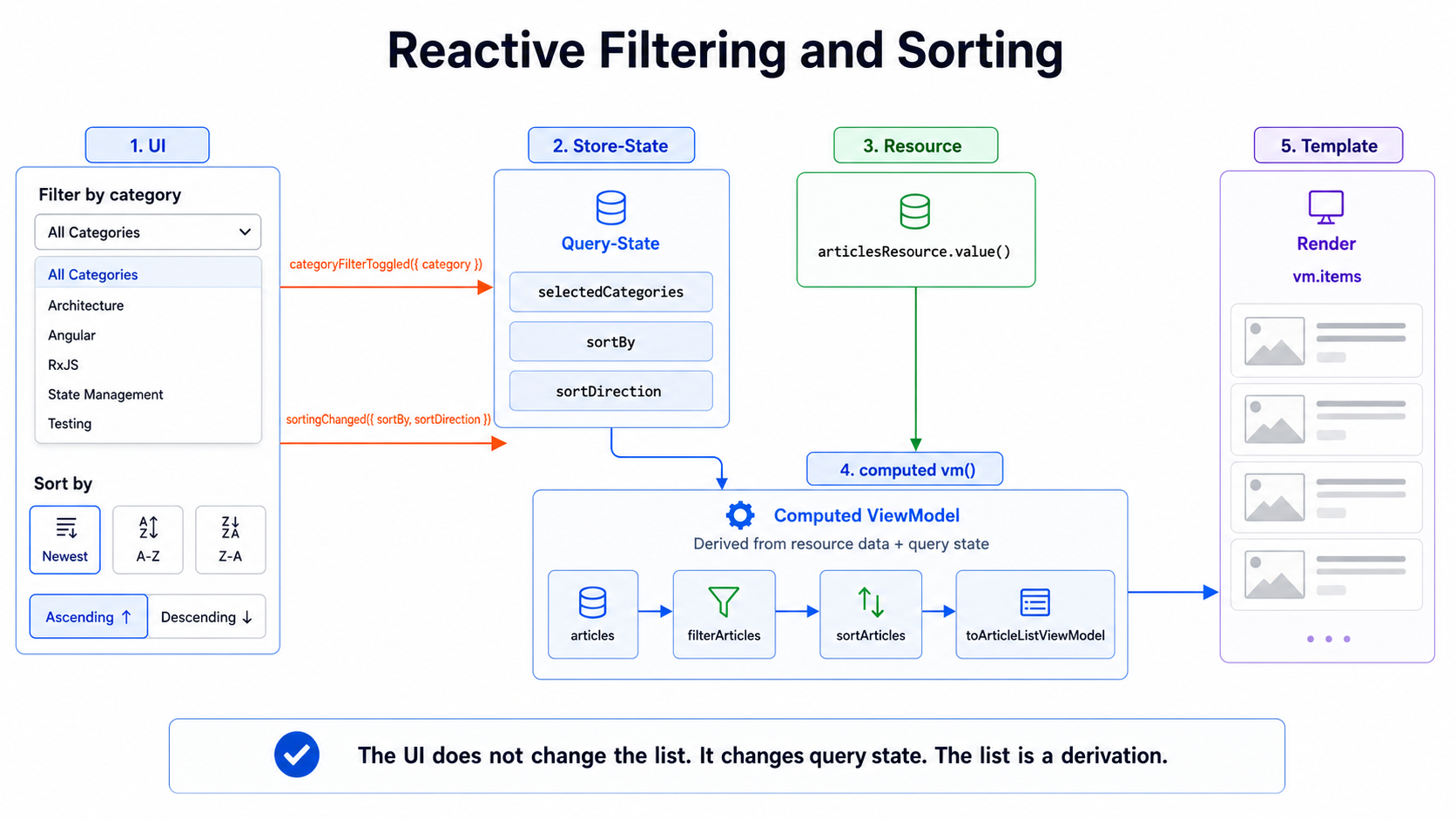
Store 将它显式建模为 Query State:
selectedCategoriessortBysortDirectionViewModel 再从中响应式派生:
articles + selectedCategories + sortBy + sortDirection → filterArticles → sortArticles → ArticleListVmUI 发送 Intent。
ViewModel 负责派生。
不是 Component 负责 Filter。
不是 Template 负责 Sort。
也不是某个 Service 直接修改 Array。
Component 只报告:
这个筛选条件被启用了,或者被关闭了。
最终什么可见,是 Store 中的一种派生。
Marble 1:随时间发生的 Intents
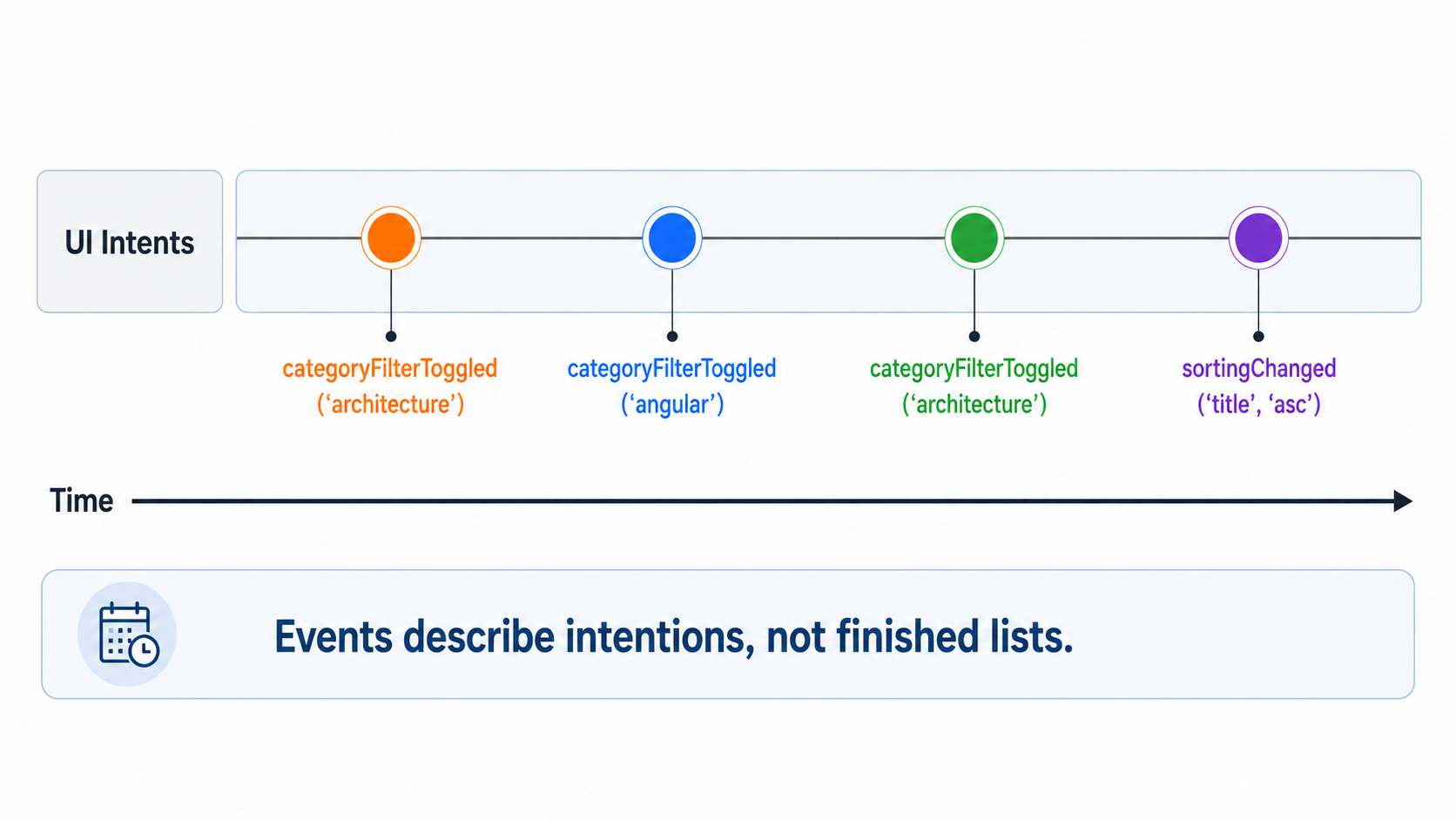
Section titled “Marble 1:随时间发生的 Intents”Filter 特别适合从时间维度来理解。
用户并不是点击一次就“重新生成列表”。
他会先后修改多个筛选条件。
Zeit ─────────────────────────────────────────────▶
UI Intent  ──●────────●────────────●──────────────●────────▶    │        │            │              │    │        │            │              └─ sortingChanged(title, asc)    │        │            └──────────────── categoryFilterToggled(architecture)    │        └──────────────────────────── categoryFilterToggled(angular)    └──────────────────────────────────── categoryFilterToggled(architecture)
这些 Event 并不是最终列表。
它们表达的是 Intent。
一次点击只是在说:
这个 Category 的筛选状态被切换了。
它并没有说:
这是新的可见列表。
这一点很重要。
因为可见列表不是在 Event 里产生的。
它来自 Event 发生之后的 State。
Events 是业务 Intents
Section titled “Events 是业务 Intents”一个常见错误,是直接把 UI Mechanic 建模成 Event。
dropdownChanged;checkboxClicked;buttonPressed;这描述了技术上发生了什么。
但对 Store 更重要的是:业务上真正表达了什么。
categoryFilterToggled;categoryFiltersCleared;sortingChanged;Dropdown 只是一种表现形式。
业务 Intent 是:
某个 Category 被加入或移出了筛选条件。
所有 Category Filter 被清除。
排序规则发生了变化。
用 NgRx Signal Events 可以这样表达:
import { eventGroup, type } from '@ngrx/signals/events';
export const articleFilterEvents = eventGroup({  source: 'Article List Filter',  events: {    categoryFilterToggled: type<{      readonly category: ArticleCategory;    }>(),
    categoryFiltersCleared: type<void>(),  },});
export const articleSortingEvents = eventGroup({  source: 'Article List Sorting',  events: {    sortingChanged: type<{      readonly sortBy: ArticleSortBy;      readonly sortDirection: SortDirection;    }>(),  },});
这些命名有意使用业务语言。
不是:
inputChanged;dropdownChanged;clickSortButton;而是:
categoryFilterToggled;categoryFiltersCleared;sortingChanged;这样 UI 就更容易被替换。
这个 Filter 最后来自 Dropdown、Checkbox List、保存的 View,还是以后来自 Query Parameter,对 Store 来说并不重要。
Store 中的 Query State
Section titled “Store 中的 Query State”Filter Condition 本身就是 State。
对于经典的多选 Filter,它不是一个 Search Text,而是一组当前激活的条件。
export type ArticleCategory = 'architecture' | 'angular' | 'testing' | 'design';
export type ArticleSortBy = 'title' | 'author' | 'category';
export type SortDirection = 'asc' | 'desc';
export interface ArticleListQueryState {  readonly selectedCategories: readonly ArticleCategory[];  readonly sortBy: ArticleSortBy;  readonly sortDirection: SortDirection;}
export const initialArticleListQueryState: ArticleListQueryState = {  selectedCategories: [],  sortBy: 'title',  sortDirection: 'asc',};
selectedCategories 描述的不是 Article 本身。
它描述的是:用户当前通过什么样的“视角”查看已经加载的 Article。
没有选择任何 Category 意味着:
不限制 Category。
选择一个 Category 意味着:
只显示属于这个 Category 的 Article。
选择多个 Category 意味着:
显示属于这些 Category 之一的 Article。
这里到底应该采用 OR 还是 AND,是一个明确的产品决策。对 Category 来说,OR 通常更自然;复杂 Facet 则可能让不同 Filter Group 使用不同规则。
Marble 2:Query State 随时间变化
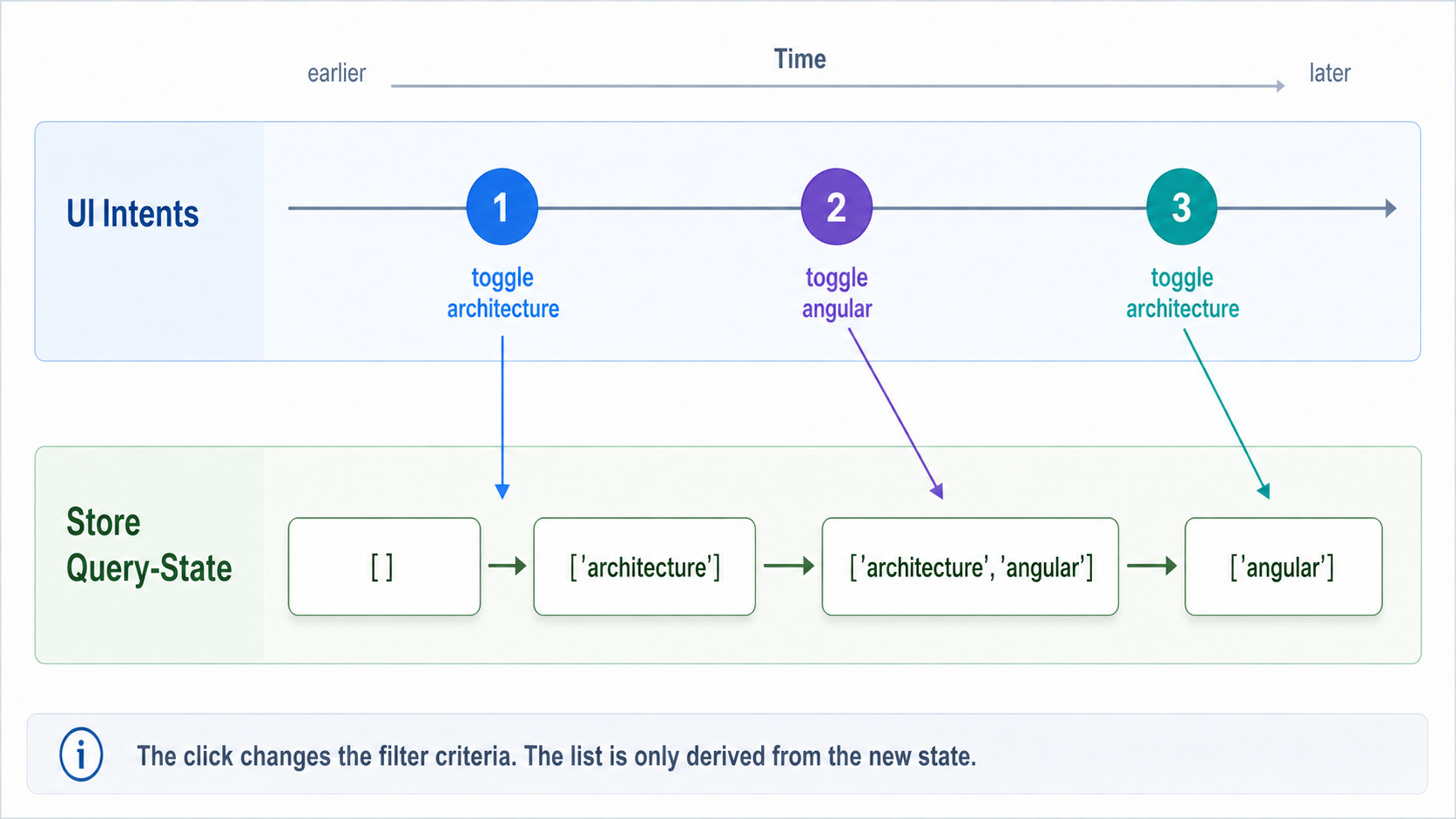
Section titled “Marble 2:Query State 随时间变化”Event 产生的是 Query State。
不是直接产生列表。
Zeit ─────────────────────────────────────────────▶
UI Intent  ──●────────────●────────────●──────────────────▶    toggle A     toggle B     toggle A
selectedCategories  ──[]───────[A]────────[A,B]────────[B]─────────▶
这才是真正的状态变化。
对于来自 Backend 或经典 OOP 背景的开发者,这一步通常最关键。
我们不再把列表看成一个需要主动改造的对象。
我们把 Filter Condition 当作 State。
列表则是它的 Projection。
ViewModel
Section titled “ViewModel”Component 不需要一个原始的 Article[]。
它需要一个 ViewModel。
export interface ArticleListVm {  readonly selectedCategories: readonly ArticleCategory[];  readonly sortBy: ArticleSortBy;  readonly sortDirection: SortDirection;  readonly items: readonly ArticleListItemVm[];}
export interface ArticleListItemVm {  readonly id: string;  readonly title: string;  readonly authorName: string;  readonly category: ArticleCategory;  readonly categoryLabel: string;}
这个 ViewModel 包含两类信息:
当前 Query State,供 UI 展示。
根据它派生出的可见 Items。
这样 Template 就能受控地 Rendering:
Dropdown 知道哪些 Category 处于激活状态。
排序按钮知道当前采用什么排序。
列表只需要 Render vm.items。
Template 不必知道更多。
用 Pure Function 代替 Component Logic
Section titled “用 Pure Function 代替 Component Logic”真正的派生可以干净地写成 Pure Function。
export const filterArticles = ({  articles,  selectedCategories,}: {  readonly articles: readonly Article[];  readonly selectedCategories: readonly ArticleCategory[];}): readonly Article[] => {  if (selectedCategories.length === 0) {    return articles;  }
  return articles.filter(({ category }) =>    selectedCategories.includes(category),  );};
Filter Function 不会修改任何东西。
它只是基于已有数据产生新的 Projection。
排序也必须同样谨慎。
不要这样:
articles.sort((left, right) => left.title.localeCompare(right.title));sort() 会直接修改 Array。
在响应式派生里这很危险,因为它可能顺手修改了原始 Resource Data。一个 Projection 就这样变成了 Side Effect。
更好的是:
export const sortArticles = ({  articles,  sortBy,  sortDirection,}: {  readonly articles: readonly Article[];  readonly sortBy: ArticleSortBy;  readonly sortDirection: SortDirection;}): readonly Article[] => {  const directionFactor = sortDirection === 'asc' ? 1 : -1;
  return [...articles].sort(    (left, right) => compareArticles({ left, right, sortBy }) * directionFactor,  );};
const compareArticles = ({  left,  right,  sortBy,}: {  readonly left: Article;  readonly right: Article;  readonly sortBy: ArticleSortBy;}): number => {  switch (sortBy) {    case 'title':      return left.title.localeCompare(right.title);
    case 'author':      return left.author.name.localeCompare(right.author.name);
    case 'category':      return left.categoryLabel.localeCompare(right.categoryLabel);  }};
在较新的 Runtime 中,也可以使用 toSorted()。但重点不是具体 API。
重点是:
排序不修改 Resource Data。
排序产生一个新的 Projection。
于是 ViewModel 可以由一条很小的 Pipeline 生成:
export const toArticleListViewModel = ({  articles,  selectedCategories,  sortBy,  sortDirection,}: {  readonly articles: readonly Article[] | null;  readonly selectedCategories: readonly ArticleCategory[];  readonly sortBy: ArticleSortBy;  readonly sortDirection: SortDirection;}): ArticleListVm | null => {  if (articles === null) {    return null;  }
  const filteredArticles = filterArticles({    articles,    selectedCategories,  });
  const sortedArticles = sortArticles({    articles: filteredArticles,    sortBy,    sortDirection,  });
  return {    selectedCategories,    sortBy,    sortDirection,    items: sortedArticles.map(toArticleListItemViewModel),  };};
const toArticleListItemViewModel = ({  id,  title,  author,  category,  categoryLabel,}: Article): ArticleListItemVm => ({  id,  title,  authorName: author.name,  category,  categoryLabel,});
这非常容易测试。
Mapper 不解释任何技术性的 Resource Status。
它只做 Projection:
readonly Article[] | null → ArticleListVm | null“当前没有可读值”的情况已经在 Infrastructure Boundary 被归一化。
不需要 Angular。
不需要 Template。
不需要 Component Fixture。
不需要 DOM。
测试可以直接验证:
给定这些 Article、这些激活 Category 和这个排序状态,是否得到预期的 ViewModel。
Marble 3:ViewModel 是派生
Section titled “Marble 3:ViewModel 是派生”现在来到真正的响应式思想。
ViewModel 来自多个 Input:
Zeit ─────────────────────────────────────────────▶
articles  ──●────────────────────────────────────────────▶    Article[]
selectedCategories  ──[]──────[architecture]────[architecture,angular]──▶
sortState  ──title asc────────────────────category desc────▶
vm()  ──VM₁────VM₂──────────────────VM₃────────VM₄────▶
只要其中任意一个 Input 发生变化,这个派生就会失效。
下一次读取时,会生成新的 ViewModel。
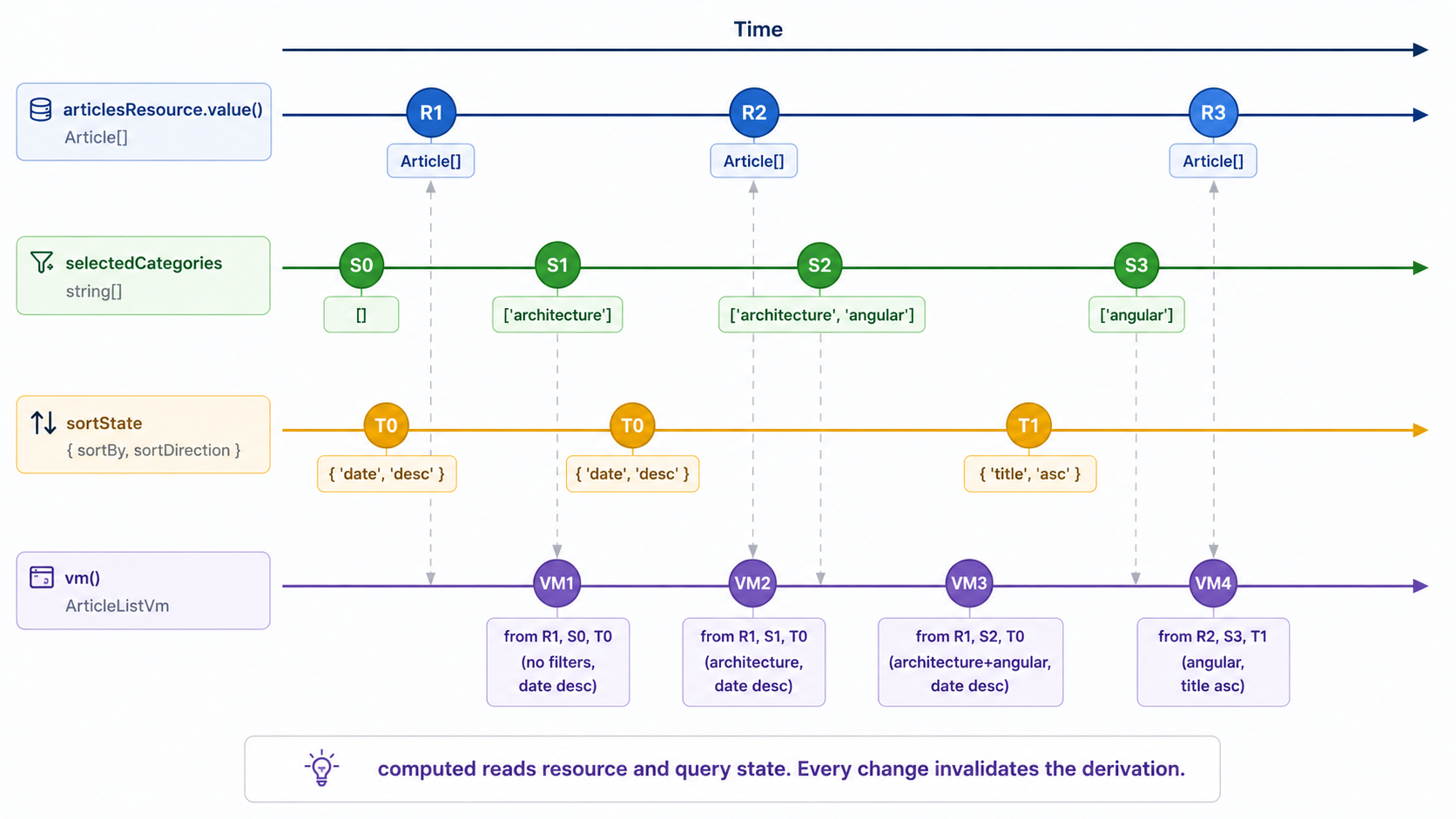
这里的 computed 不是一个“顺手很好用”的 Detail。
它就是架构边界:
Source Signal+ Query-State= ViewModel在 Store 中使用 withComputed
Section titled “在 Store 中使用 withComputed”现在把派生接进 Store。
ArticleResource 提供已加载 Article 的命名 Source Signal。
Store 持有 Query State。
withComputed 生成 ViewModel。
具体的 HttpResourceRef 继续完全留在 Infrastructure。
因此 Store 不认识:
hasValue();value()的抛错行为;ResourceStatus;- Request 或 Parse Detail。
它只消费:
articles: Signal<readonly Article[] | null>import { computed, inject } from '@angular/core';import { patchState, signalStore, withComputed, withProps, withState,} from '@ngrx/signals';import { Events, withEventHandlers } from '@ngrx/signals/events';import { tap } from 'rxjs';
export const ArticleListStore = signalStore( withState(initialArticleListQueryState),
withProps(() => ({ _articleResource: inject(ArticleResource), })),
withComputed( ({ _articleResource, selectedCategories, sortBy, sortDirection, }) => ({ vm: computed(() => toArticleListViewModel({ articles: _articleResource.articles(), selectedCategories: selectedCategories(), sortBy: sortBy(), sortDirection: sortDirection(), }), ), }), ),
withEventHandlers((store, events = inject(Events)) => ({ toggleCategoryOnCategoryFilterToggled$: events .on(articleFilterEvents.categoryFilterToggled) .pipe( tap(({ category }) => { const selectedCategories = toggleSelectedCategory({ selectedCategories: store.selectedCategories(), category, });
patchState(store, { selectedCategories }); }), ),
clearCategoriesOnCategoryFiltersCleared$: events .on(articleFilterEvents.categoryFiltersCleared) .pipe( tap(() => { patchState(store, { selectedCategories: [] }); }), ),
setSortingOnSortingChanged$: events .on(articleSortingEvents.sortingChanged) .pipe( tap(({ sortBy, sortDirection }) => { patchState(store, { sortBy, sortDirection, }); }), ), })),);Toggle Function 同样保持为 Pure Function:
const toggleSelectedCategory = ({  selectedCategories,  category,}: {  readonly selectedCategories: readonly ArticleCategory[];  readonly category: ArticleCategory;}): readonly ArticleCategory[] => {  if (selectedCategories.includes(category)) {    return selectedCategories.filter(      (selectedCategory) => selectedCategory !== category,    );  }
  return [...selectedCategories, category];};
这个结构有意保持简单。
withProps 注入 Infrastructure Adapter。
withState 持有 Query State。
withComputed 派生 ViewModel。
withEventHandlers 响应业务 Intent。
因此 Store 本身读起来就像一份架构概览:
articles+ selectedCategories+ sortBy+ sortDirection  → ArticleListVm
filter intent  → Query-State
Angular Resource 的技术保护逻辑在这里已经不可见。
不是因为它消失了。
而是因为它已经在技术 Source 上被封装。
为什么这里不直接用空数组作为 Default?
Section titled “为什么这里不直接用空数组作为 Default?”对于 Collection 来说,空 Array 本身当然是有效值。
但本文仍让 Source 一开始保持:
readonly Article[] | null因为当前 Template 需要区分:
noch kein lesbarer Wert  → Placeholder
erfolgreich geladene leere Liste  → ViewModel mit items: []
当然也可以一开始就返回 []。
那样就必须通过一个独立 Signal 区分 Loading/“尚未加载”和真正的 Empty State。
这同样可以是一个干净的切法,只是不同而已。
本文刻意让 null 表达“当前没有可读 Source Value”的归一化状态。
这里还值得看一下 tap 的角色。
很多 RxJS 讨论会正确地警惕 tap,因为应用逻辑经常被悄悄藏进去。但这里情况不同。
我们正处在 Store 内一个明确的命令式 Boundary。
一个 Event 进入。
Store State 被修改。
这里的 tap 正是在表达这件事:
tap(({ category }) => {  const selectedCategories = toggleSelectedCategory({    selectedCategories: store.selectedCategories(),    category,  });
  patchState(store, { selectedCategories });});
这不是 Component 中隐藏的 Side Effect。
这是 Intent 更新 Query State 的明确位置。
越过这条边界之后,列表继续只是派生。
computed 在这里做了什么
Section titled “computed 在这里做了什么”这个 computed 会读取四样东西:
articleResource.articles()selectedCategories()sortBy()sortDirection()其中任何一项发生变化,派生都会失效。
下一次读取时会产生新的 ViewModel。
这就是中心思想。
用户点击时,并不是在“改列表”。
他只是在修改 selectedCategories。
用户排序时,也不是在直接排序 Array。
他只是在修改 sortBy 和 sortDirection。
可见列表是这些 State 的结果。
articles + selectedCategories + sortBy + sortDirection → ArticleListVm这样 UI 就不会与 Framework 对抗,而是在使用 Framework 本身的响应式模型。
State 改变。
派生失效。
下一次读取时生成新的 Projection。
Facade:向外提供 Intents
Section titled “Facade:向外提供 Intents”Component 不需要直接认识 Store。
一个很小的 Facade 就足够:
import { inject, Injectable } from '@angular/core';import { injectDispatch } from '@ngrx/signals/events';
@Injectable()export class ArticleListFacade {  private readonly store = inject(ArticleListStore);  private readonly dispatchFilter = injectDispatch(articleFilterEvents);  private readonly dispatchSorting = injectDispatch(articleSortingEvents);
  readonly vm = this.store.vm;
  readonly toggleCategoryFilter = (category: ArticleCategory): void => {    this.dispatchFilter.categoryFilterToggled({ category });  };
  readonly clearCategoryFilters = (): void => {    this.dispatchFilter.categoryFiltersCleared();  };
  readonly changeSorting = ({    sortBy,    sortDirection,  }: {    readonly sortBy: ArticleSortBy;    readonly sortDirection: SortDirection;  }): void => {    this.dispatchSorting.sortingChanged({ sortBy, sortDirection });  };}
Facade 把 UI 调用翻译成业务 Intent。
Component 不需要知道后面是 Store、Events、Signals,还是以后新增了其他 Logic。
它只得到:
vm;toggleCategoryFilter();clearCategoryFilters();changeSorting();这就是它的 Contract。
Template:负责 Rendering,不负责计算
Section titled “Template:负责 Rendering,不负责计算”Template 保持很无聊。
比如:
@let vm = facade.vm();
@if (vm) {  <button    type="button"    [attr.aria-pressed]="vm.selectedCategories.includes('architecture')"    (click)="facade.toggleCategoryFilter('architecture')"  >    Architecture  </button>
  <button    type="button"    [attr.aria-pressed]="vm.selectedCategories.includes('angular')"    (click)="facade.toggleCategoryFilter('angular')"  >    Angular  </button>
  <button    type="button"    (click)="facade.clearCategoryFilters()"  >    Filter zurücksetzen  </button>
  <button    type="button"    (click)="      facade.changeSorting({        sortBy: 'title',        sortDirection: 'asc'      })    "  >    Titel aufsteigend  </button>
  @for (item of vm.items; track item.id) {    <article>      <h2>{{ item.title }}</h2>      <p>{{ item.authorName }}</p>      <p>{{ item.categoryLabel }}</p>    </article>  }} @else {  <app-list-placeholder />}
Template 不做 Filter。
Template 不做 Sort。
Template 只 Render vm.items。
它展示输入,并把 Intent 发送回去。
仅此而已。
这不是在限制 UI。
而是在减轻 UI 的职责。
列表逻辑越少出现在 Template 里,边界就越清楚:
UI 展示 State。
UI 报告用户 Intent。
Store 持有 Query State。
ViewModel 负责 Projection。
为什么 OOP 背景的开发者会觉得不习惯
Section titled “为什么 OOP 背景的开发者会觉得不习惯”在经典 OOP 思维里,很自然会拿一个列表,然后对它调用方法。
list.activateFilter(category);list.sortByTitle();list.getVisibleItems();翻译到 Component Logic 里,也许就是:
this.visibleItems = this.items.filter(...);这种方式感觉很直接。
但现代 Frontend Framework 并不主要按这种方式工作。Angular、React 和 Vue 都不希望我们在每个地方手工建立小 Controller,然后不断同步可见 State。
更适合它们的表达方式是:
这是 State。
这是从 State 得到的派生。
这是派生结果的 Rendering。
用于响应式 Filter 时,不是:
用户点击之后,我重建这个列表。
而是:
用户点击之后,Filter State 改变。列表自然从新的 State 中派生。
这不是学术差异。
它减少了 State 彼此失去同步的地方。
Client 侧还是 Server 侧?
Section titled “Client 侧还是 Server 侧?”本文描述的是:对已经加载的数据做 Client-side Filter 和 Sort。
以下情况通常适合这样做:
数据量足够小。
列表已经完整加载。
Operation 接近表现层。
结果不需要重新进行业务数据查询。
Server-side Filter 与 Sort 更适合这些情况:
Payload 很大。
涉及 Pagination。
权限会影响查询结果。
性能或数据规模不适合 Client 处理。
Query 在业务上决定哪些数据根本允许被加载。
可以记住这句话:
Client Filter 对已有 State 做筛选和排序。
Server Filter 改变 Infrastructure Source 的 Query。
即使是 Server-side Filter,整体思想仍然相似:UI 发送 Intent,Store 持有 Query State,ArticleResource 再从中派生技术性的 Resource Query。只是派生不再完全发生在 Client,而有一部分进入数据源。
这是另一个主题。
本文刻意只处理已经存在的 Resource Data。
这样做有什么改善
Section titled “这样做有什么改善”这种结构乍看会比 Component 中快速写一个 items.filter(...) 更啰嗦。
但它换来的是清晰度。
Query State 是显式的。
派生集中在一个地方。
Pure Function 可以直接测试。
Component 保持薄。
Template 不承担列表逻辑。
Source Data 不会被修改。
技术性的 httpResource 留在 Infrastructure。
更重要的是,心智边界变得非常清晰:
UI Intent → Query-State → ViewModel-Ableitung → Rendering这就是前端战术设计。
不是因为它复杂。
而是因为它把职责分开了。
Filter 与 Sort 不是 Component Code。
它们属于 Query State。
列表也不是一个被不断修改的 Array。
它是一种派生。
Infrastructure 提供安全的 Source Signal。
UI 发送 Intent。
Store 持有 Query State,并编排 Projection。
ViewModel 负责投影。
Template 负责 Rendering。
这就是最重要的视角转换:
不是 Component 构造可见列表。
可见列表会从已有 Article、当前激活的 Filter Condition 和排序 State 中响应式地产生。